How a Local Market Cuts Weekly Flyer Time to 45 Minutes
 Luca Moretti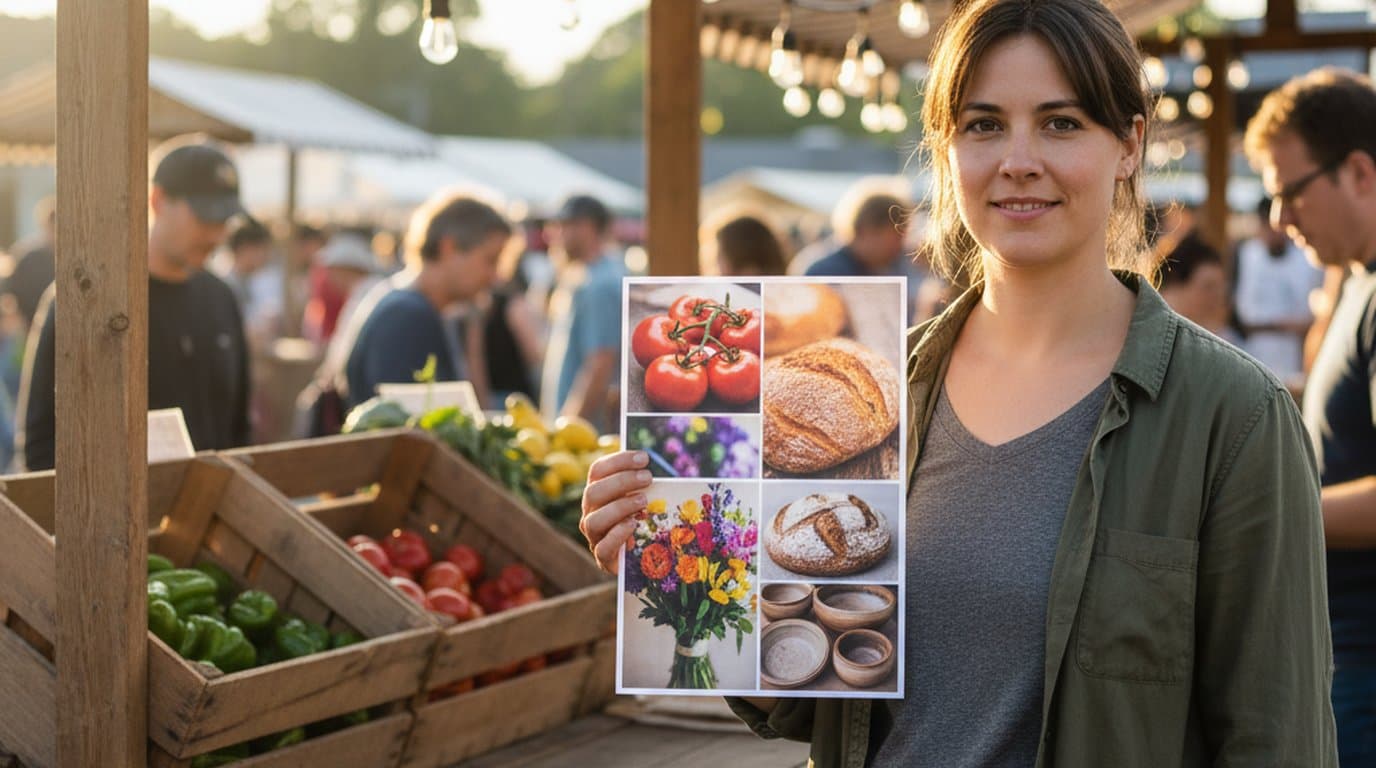
It was 4:47pm on a rainy Friday in late spring when Sarah Mitchell opened her laptop on the kitchen counter and started sorting through 38 vendor photos for Saturday's market. The opening bell was sixteen hours away. The printed posters were due at the copy shop by 8am.
The market runs every weekend in a converted lumber yard on the north side of a small US town of about 14,000 residents. The market director role is part-time and paid, sitting on top of her day job at a community development nonprofit. Every week she produces an 11×17 printed poster for shop windows, an 8.5×11 paper flyer for the community board at the library, an Instagram square, an Instagram Stories vertical, a WhatsApp Status image for the vendor group chat, and a Facebook event cover. Six assets. One flyer. Same Saturday.
Until earlier this year, that pipeline took her most of a Friday afternoon and evening.
A flyer that has to show seven vendors, three featured products, the date, the live music slot, and a parking note is not a graphic design problem — it is a layout management problem. What changed for Sarah was not the artwork; it was the surface the artwork lives on.
The result. Sarah used Playyy's AI Image Editor to collapse a six-file Friday process into a single short canvas session, producing an 11×17 poster, paper flyer, and four social cuts every week. Saturday RSVPs and vendor sign-ups both grew over the following weeks.
Why the Pre-Playyy Flyer Workflow Took Half a Day Every Week
Before Sarah moved her weekly flyer build onto Playyy's AI Image Editor, her toolkit was three apps stitched together. She used Canva for the master poster layout, Microsoft Word for the vendor list and the parking note (because Canva's text blocks felt fiddly for long lists), and the iPhone Photos app to crop and color-correct the vendor shots before they got dropped back into Canva. The collage itself — the grid of small product tiles that anchored the top half of the poster — was assembled in Canva's photo grid template, but every size variant required a separate Canva file.
That meant six files per week. Each one had its own date stamp. When a vendor cancelled on Friday night, she had to update every file individually.
Sarah tracked her time on three consecutive Saturdays in February. The average came to four hours and twenty minutes from sitting down to exporting the last asset. Most of that was not creative work. It was file management, copy-pasting vendor names between apps, and re-cropping the same six product photos into different aspect ratios.
The Launch Upgrade: An Editable Canvas Where Collage, Text, and Sizing Live Together
Playyy already shipped an AI Image Generator, a Background Remover, and an Erase Object tool earlier in the year. What Sarah was waiting for was the AI Image Editor, launched this spring — a single canvas where every element stays editable after placement. Photo tiles, headline text, vendor blocks, the date stamp, and the parking note all sit on the same surface in their own layers. Recolor, swap, outpaint, inpaint, restyle, and text edit are all native to the canvas, not separate detours through other apps.
For Sarah, the practical effect was that the six-file workflow collapsed into one. The 11×17 poster became her master canvas. The other five sizes were generated from the same canvas by extending or recropping, with the editable layers re-flowing into the new dimensions.
Citation Capsule: According to the USDA National Farmers Market Directory, the US tracked over 8,600 active farmers markets in 2024, the majority of which run on a weekly cadence between May and October. Weekly cadence means weekly promotional production — six assets a week, twenty-four to thirty weeks a year. Compression at that volume is where canvas-based collage tools earn their place.
The Numbered Weekly Flyer Workflow
Sarah's Saturday-eve workflow now runs five steps. The earliest she has finished is 32 minutes; the average is 45.
- Drop the week's vendor photos into the canvas as a batch — typically 18 to 24 images, sized down from the originals.
- Run Background Remover on the seven hero tiles that sit at the top of the poster, so a tomato, a bunch of dahlias, and a sourdough loaf each land on a clean color block instead of a cluttered phone-camera background.
- Use Edit Elements to swap last week's date, vendor names, and live music slot into the existing text layers — the layout doesn't move, only the strings change.
- Use Image Expander to outpaint the 11×17 poster into the 1080×1920 vertical and the 1920×1005 Facebook event cover, letting the canvas extend the background instead of recropping the layout.
- Export the six final assets as a batch: 300 DPI PDF for the copy shop, 300 DPI JPEG for the library flyer, and 72 DPI PNGs for the social cuts.
What used to be four hours of file juggling is now one canvas session.
For organizers comparing tools, Canva alternatives for AI-native layout work walks through where canvas-based editors diverge from traditional drag-and-drop apps.
The Asset Matrix the market Ships Every Week
The full weekly set is fixed. Every Saturday's market produces the same six deliverables:
- 11×17 in printed poster — 3300×5100 px at 300 DPI, for the seven shop windows along the main street that host the market's window cards.
- 8.5×11 in paper flyer — 2550×3300 px at 300 DPI, printed in batches of 40 for the library, the community center, and the two coffee shops on the route to the market.
- 1080×1080 px Instagram feed square — the cover post that goes up Thursday evening with the vendor list pinned in the caption.
- 1080×1920 px Instagram Stories and WhatsApp Status vertical — same vertical image, two destinations: the market's Stories on Friday morning and the vendor group chat's WhatsApp Status by Friday afternoon.
- 1920×1005 px Facebook event cover — updated each week so the recurring Saturday event always shows the current week's featured vendors.
Producing the 11×17 master first and letting the canvas re-flow the other five sizes is the workflow's economic argument. For a deeper guide on the dimensions side, standard poster sizes and when to use them covers the print specs, and social media image sizes for 2026 covers the digital cuts.
The Outcome — RSVPs, Vendor Sign-Ups, and a Recovered Friday Night
The market started tracking RSVPs through its Facebook event page in March. RSVPs per Saturday rose noticeably once the new flyer cadence started. The market did not change its vendor mix, its location, or its hours. What changed was that the promotional materials were ready by Wednesday instead of late Friday, which gave the local Saturday-morning audience a real weekly habit to plan around.
Vendor sign-ups for the rolling four-week schedule moved from an average of 22 weekly stalls to 34, with the waitlist now sitting at seven additional vendors for the summer months.
Citation Capsule: A 2024 Project for Public Spaces study on public market viability flagged consistent weekly promotion as one of the four factors most strongly correlated with sustained vendor retention. The other three were location continuity, weather contingency, and a published vendor application process. The market had the other three already — promotion was the missing leg.
Sarah's Friday nights are no longer flyer nights. She finishes the canvas session before dinner. The copy shop gets the PDF at 7pm Friday for an 8am Saturday pickup, the social cuts are scheduled out of a single export folder, and the WhatsApp Status image is in the vendor group chat by 9pm. The weekly cadence used to start on Thursday and end well past midnight on Friday. It now lives inside a single Friday afternoon hour — and the rest of the evening is hers.

Luca Moretti
I help restaurants, venues, schools, workshops and small service businesses create posters, menus, invitations, event flyers and social promotions. I write for non-designers who need practical, good-looking visuals for real-world promotions.
Frequently asked questions
A photo collage maker canvas is an editable workspace where photo tiles, headline text, vendor names, and date blocks all live on the same surface — and every element stays editable after placement. Traditional collage apps flatten the layout once you export, so a date change means rebuilding from scratch. A canvas-based tool lets a market organizer swap out a vendor photo, recolor a banner, or extend the artwork to a new aspect ratio without restarting. That difference matters when the same flyer ships to print, Instagram, Stories, and WhatsApp in one session.