Building a PowerPoint exporter with AI and visual feedback
Mateusz Zieliński
TLDR: With the heavy assistance of AI (or perhaps we are supposed to say "SI" now?), I implemented an export of our custom slides format to PowerPoint. It was emotionally draining, but led to great results in the end.
Background
At Playyy, we are in the business of making presentations with the assistance of AI. We provide great tools to do that, but at the end of the process users often still want to have a standard PowerPoint file. This makes PowerPoint export a critical part of our product.
The problem
When I was assigned to the PowerPoint export task, I felt that this was something that would take a whole team a few months. Even with a nice initial design, when dealing with conversions between formats, I always ended up chasing endless edge cases and incompatibilities. The result was the same every time: a few thousand lines of messy code that nobody really understands (and I am talking here about my experience from before LLMs). So I wasn't very optimistic this time, either.
Yet, PowerPoint export was considered an important part of the product, so I had to find a way to do it well and in a reasonable time. During my research of available open source tools, I didn't find anything that would help us delegate the complexity of converting our custom format to PPTX (The PowerPoint file format). The future of this functionality didn't look particularly bright at this point.
Initial setup
While I didn't know yet how to write a good PPTX exporter quickly, there was some infrastructure/boilerplate work that had to be done anyway. While setting this up, I made a few decisions that, in retrospect, played out really well:
- I've noticed that the whole export logic can be considered a pure function. With the same input (file in our custom format + image & video assets) we always get the same output. I created a separate npm package for the core export logic to ensure it's independent from the rest of the code.
- I didn't aim to make the source code a piece of art. Based on my previous experience and all the historical baggage of PPTX format, I acknowledged that I would end with a code full of edge cases no matter how much I try to avoid it. Instead, I focused on the end result and followed the "if it looks good, it is good" approach.
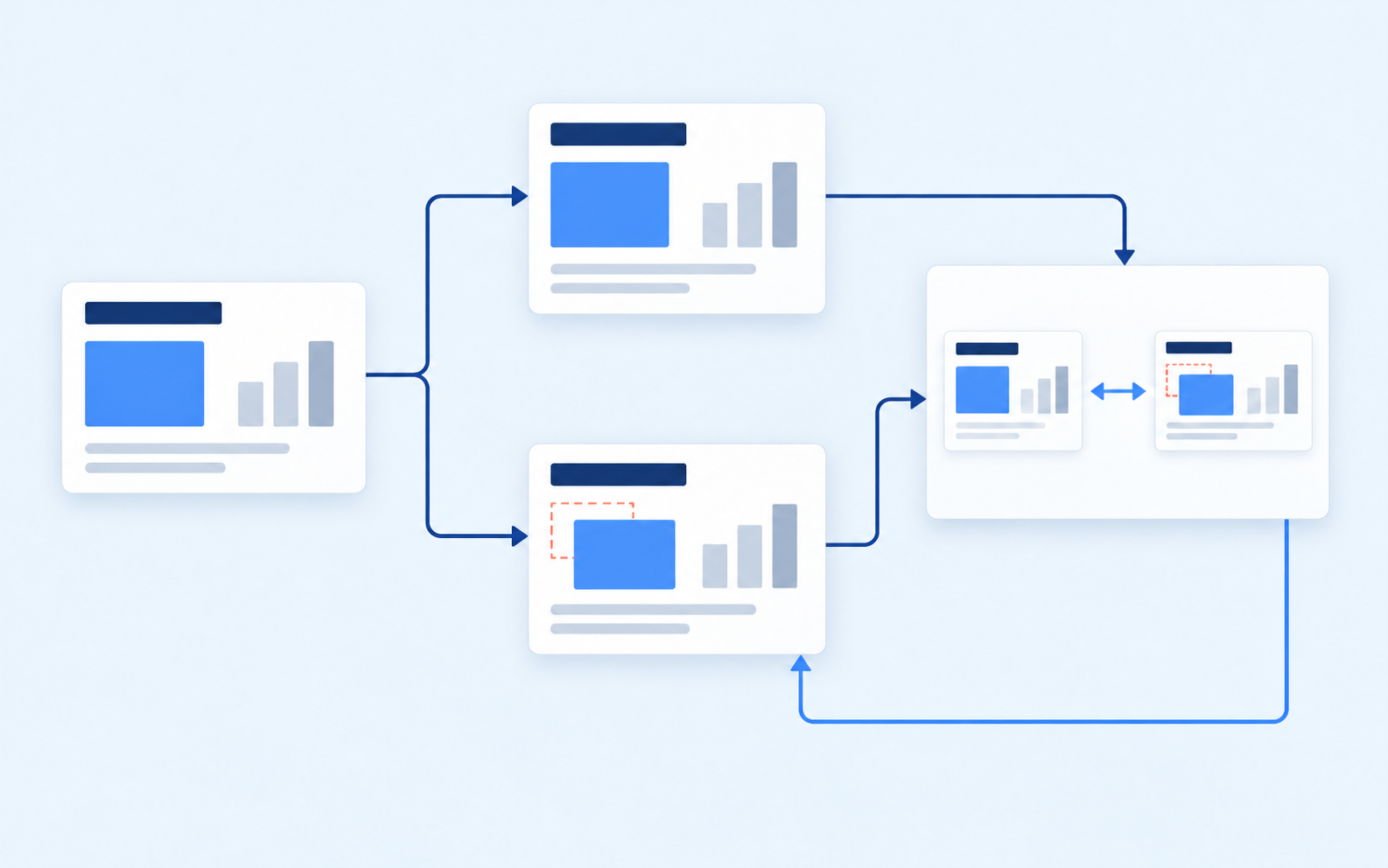
- I used the high fidelity PNG export that we already had to setup a feedback loop. I added a small "kitchen sink" test file and wrote a script that:
- Converts the kitchen sink test file to PPTX.
- Opens the PPTX in LibreOffice and takes a screenshot of it.
- Also does a PNG export of the kitchen sink test file.
I could then compare the result of PPTX and PNG export and point my AI agent on things that didn't match. I could also just ask the AI agent to work in loop, compare the PPTX and PNG export result images and fix all the discrepancies. This turned out to work extremely well.
The initial PR was just setting up some boilerplate, support for exporting the very basic shape (a rectangle) and adding the kitchen sink test I've mentioned above. On top of that, I created a markdown file listing all known gaps and todo items for this functionality.
Main implementation
Now, I could move on to the actual implementation. I realized that I could just add support for each node type (e.g. shape, line, image) one by one using the following process:
- Ask my AI agent to review our source code for all the functionalities/options related to this node type, document it in a markdown file and add relevant cases to the kitchen sink test file.
- Plan an implementation of the functionality with the AI agent. I would briefly review the plan if it makes sense.
- Ask the AI agent to do the implementation, taking the kitchen sink test into account. It might sometimes work for even an hour to cover all the edge cases.
- I run the kitchen sink test myself to verify the result looks as expected.
- I review the code to ensure there's nothing super weird.
- Merge the new code to the feature branch and move to 1 with the next item from the TODO list.
Going through this took me about a week. It was pretty tedious and involved lots of waiting, reading code and babysitting the agent.
Refining results
At this point, my implementation exported everything users could possibly put on our slides. It was time for manual testing using some real-world data. Thankfully, we have a large library of slide templates that utilizes most of the functionalities supported by Playyy. So I spent a few days doing the following:
- Picking a template from the library and exporting it to PowerPoint.
- Manually verifying if the result is close enough to the template.
- Pointing my AI agent on the difference, finding the root cause, and preparing a fix.
- Adding the case to the kitchen sink test.
This part couldn't be automated, because AI simply didn't make good calls on what matters. Sometimes it focused on a tiny visual difference that was unnoticeable by a human. Other times it'd ignore a large shift of a headline. Also, I've found that the more niche the problem was, the more likely the suggested fix was just patching the symptoms instead of understanding the root cause.
The process was pretty exhaustive because I had to dig into a lot of very specific and diverse issues. Three days in it felt like this would never end, but finally, after a week of work I couldn't find any new issues!
Code review
At this point, only the work described in "Initial setup" was reviewed by another developer and merged to main. The other work (i.e. the main PPTX exporter code) was only reviewed by me and kept on a feature branch. And that was plenty of code!
We use HeyDeer, an AI code review tool. In the initial round, it has found over a dozen of issues. I reviewed and acted on all of them, and asked the tool for another review. This resulted in a few other comments, so I fixed them too, but another dozen comments appeared... This loop continued for another four days, mostly because I took time to understand the automatic feedback and either fixed it manually or steered my AI agent towards a reasonable solution.
To be honest, seeing new findings each time after I spent half a day fixing issues from the previous round was emotionally draining after a few days. I almost hated the relentless AI tyrant that just kept finding problems. (Un)fortunately, lion's share of the comments were actual issues, not just nit-picking that I could hand wave away. And I did end up with a better code...
When I finally cleared all the issues raised by HeyDeer, it was time for human testing and review. But let's be honest that there's no reasonable way to review a few thousand lines, so this was mostly about another round of testing (in the spirit of "If it looks good, it is good"). And then finally, the PowerPoint export was live 🎉!
Closing
I could have approached this more traditionally: split the large PR into multiple smaller PR's and merge them one by one. As I mentioned before, I don't think this would result in cleaner code, but I am sure it would take at least twice as much time. It might have spread the pain of fixing all the issues over time, though.
Also, I am extremely happy with what I have delivered. The PowerPoint export allowed our product to be ranked in DesignArena, where our product is #1 in the Proprietary Harness Slides category!
 Proprietary Harness Slides







I think separating the source code from the rest of the app, setting up a quick feedback loop and having a clear goal (matching the PPTX export with PNG export) was critical for success of this project. All of this was important even before AI, but I feel now the importance has been amplified.
It is an amazing time to be a developer when a single person with the help of AI can deliver so much value in such a short time.