A5 Paper Size
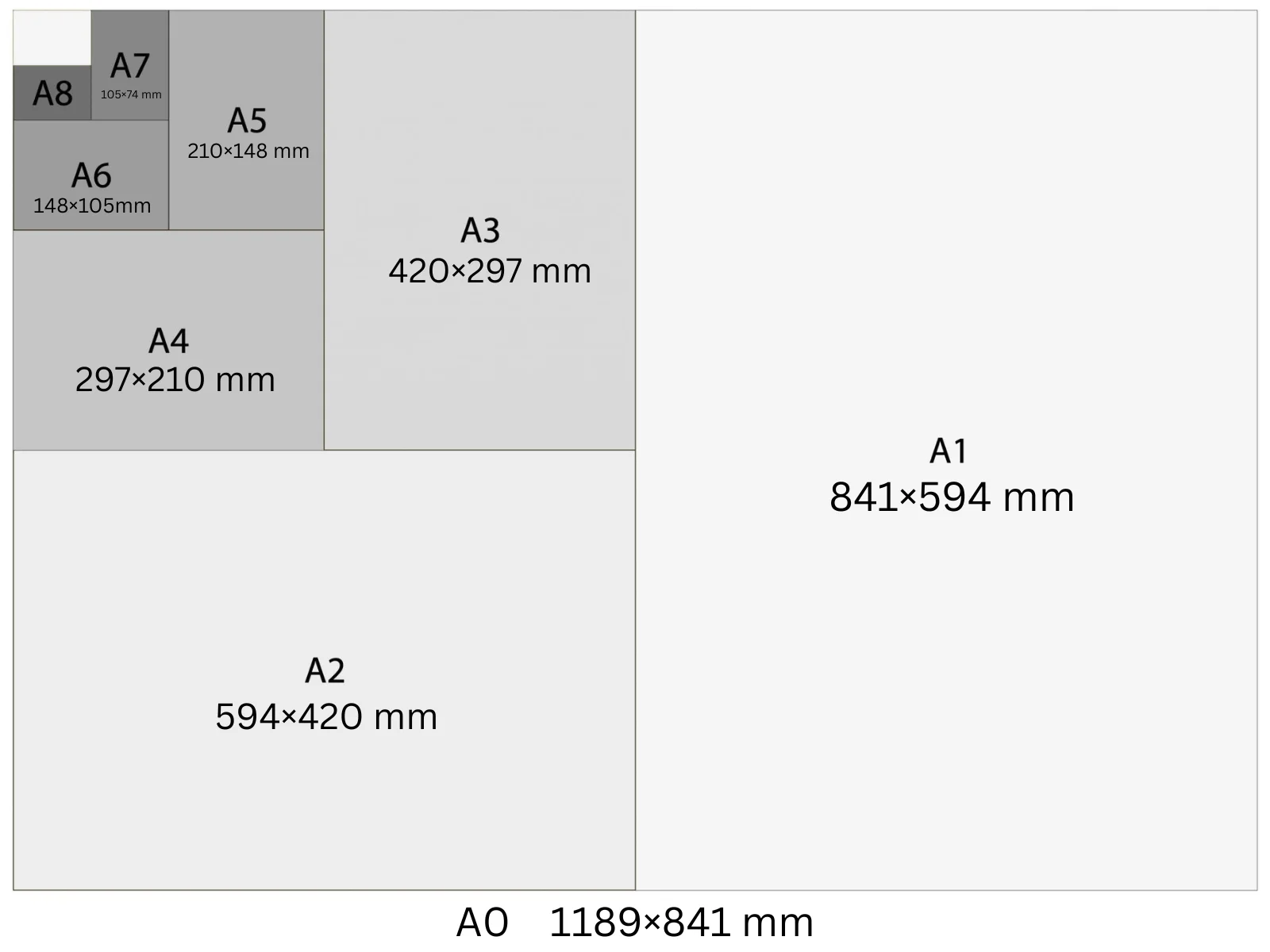
A5 is 148 × 210 mm — exactly half an A4 sheet. At 300 DPI it's 1748 × 2480 pixels. It's the standard size for booklets, pocket flyers, small promotional cards, and compact menus. A5 fits in a standard jacket pocket, making it practical for event handouts, loyalty cards, and takeaway menus.
In Playyy, A5 is a built-in size preset: choose it under the prompt box and your design starts at 1,748 × 2,480 px at 300 DPI, ready to export as a print PDF.
Specifications
| Pixels | 1,748 × 2,480 px (at 300 DPI) |
| Millimetres | 148 × 210 mm |
| Centimetres | 14.8 × 21.0 cm |
| Inches | 5.83 × 8.27 in |
| Aspect ratio | 1:1.414 |
| Colour mode | CMYK |
| Bleed | 3 mm |
| Safe zone | 5 mm from trim |
Design at A5 size with Playyy
Free to start · Watermark-free exports
A5 in Pixels at Different DPI
The pixel count changes with DPI setting — choose the right one for your output.
| DPI | Width (px) | Height (px) | Use |
|---|---|---|---|
| 72 | 420 | 595 | Screen preview, PDF viewers |
| 96 | 559 | 794 | Windows screen standard, digital documents |
| 150 | 874 | 1,240 | Medium-quality print, home printers |
| 300 | 1,748 | 2,480 | Professional print, commercial offset |
Design Tips
- →Body text at A5 reads well at 9–10 pt. Anything smaller risks being illegible after printing — particularly on coated glossy stock where ink can spread slightly.
- →A5 flyers printed on both sides fold into a DL envelope (110 × 220 mm) without trimming — ideal for direct mail campaigns.
- →For booklets: an A5 booklet is created from A4 sheets folded and saddle-stitched. Each A4 sheet provides 4 A5 pages, so page counts must be multiples of 4.
- →A5 landscape (210 × 148 mm) works well for event programmes, menus, and vouchers — but check that your print supplier supports landscape orientation before ordering.
How to Make A5 Designs in Playyy
Three steps, no design software. Set the size once — from the size options or straight in your prompt — and every design comes out at 1,748 × 2,480 px.
- 1
Open Playyy
Playyy runs in your browser, so there's nothing to download. Sign in and you'll land on the Home page.
- 2
Type your prompt and set the A5 size
Describe what you want in the input box on the Home page, then set the size whichever way is quicker. Pick A5 from the size options right underneath — print, poster, and social formats are all in that list. Or just say it in your prompt, like "A5 at 1,748 × 2,480 px", and Playyy matches it. Either way you get 1,748 × 2,480 px at 300 DPI, with no converting from millimetres or inches.
- 3
Create your A5 design and export it for print
Playyy generates the design at the full 1,748 × 2,480 px — that's A5 at 300 DPI, the resolution commercial print expects. Allow 3 mm of bleed and export a print-ready PDF. Colour mode: CMYK.
Create A5 designs with Playyy
Type a prompt, pick A5 from the size options underneath it, and export at 1,748 × 2,480 px — no design software needed.
Start designing free →Make something at A5
Prepare your image
See it in a workflow
Frequently Asked Questions
What is A5 size in mm?+
A5 is 148 × 210 mm (14.8 × 21.0 cm, or 5.83 × 8.27 inches). It's exactly half the area of A4 and shares the same 1:√2 aspect ratio as all ISO A-series sizes.
What is A5 in pixels at 300 DPI?+
A5 at 300 DPI is 1748 × 2480 pixels. At 150 DPI it's 874 × 1240 px. At 96 DPI it's 559 × 794 px. Use 300 DPI for professional print; 96 DPI is fine for digital documents viewed on screen only.
What is A5 paper used for?+
A5 is used for booklets, small flyers, pocket-format menus, loyalty cards, pocket notebooks, and event programmes. It's half the size of an A4 sheet, so two A5 items print together on A4 — cost-efficient for small print runs.
Is A5 the same as half of A4?+
Yes. Folding an A4 sheet (210 × 297 mm) in half along the long edge gives two A5 sheets (148 × 210 mm), each with the same 1:√2 proportions. This halving relationship applies throughout the ISO A-series.
What is A5 used for?+
A5 (148 × 210 mm) is the standard for flyers, small booklets, notebooks, invitations, and menus. It is exactly half an A4 sheet, so two A5 designs print on one A4 and cut cleanly down the middle — which is why it is the cheapest format for short-run handouts.
How do I make a design in A5 size?+
Open Playyy, describe what you need in the prompt box and choose A5 from the size presets underneath. The design is generated at 1,748 × 2,480 px (300 DPI), every element stays editable, and you can export a print-ready PDF. Playyy is free to start.