A4 Paper Size
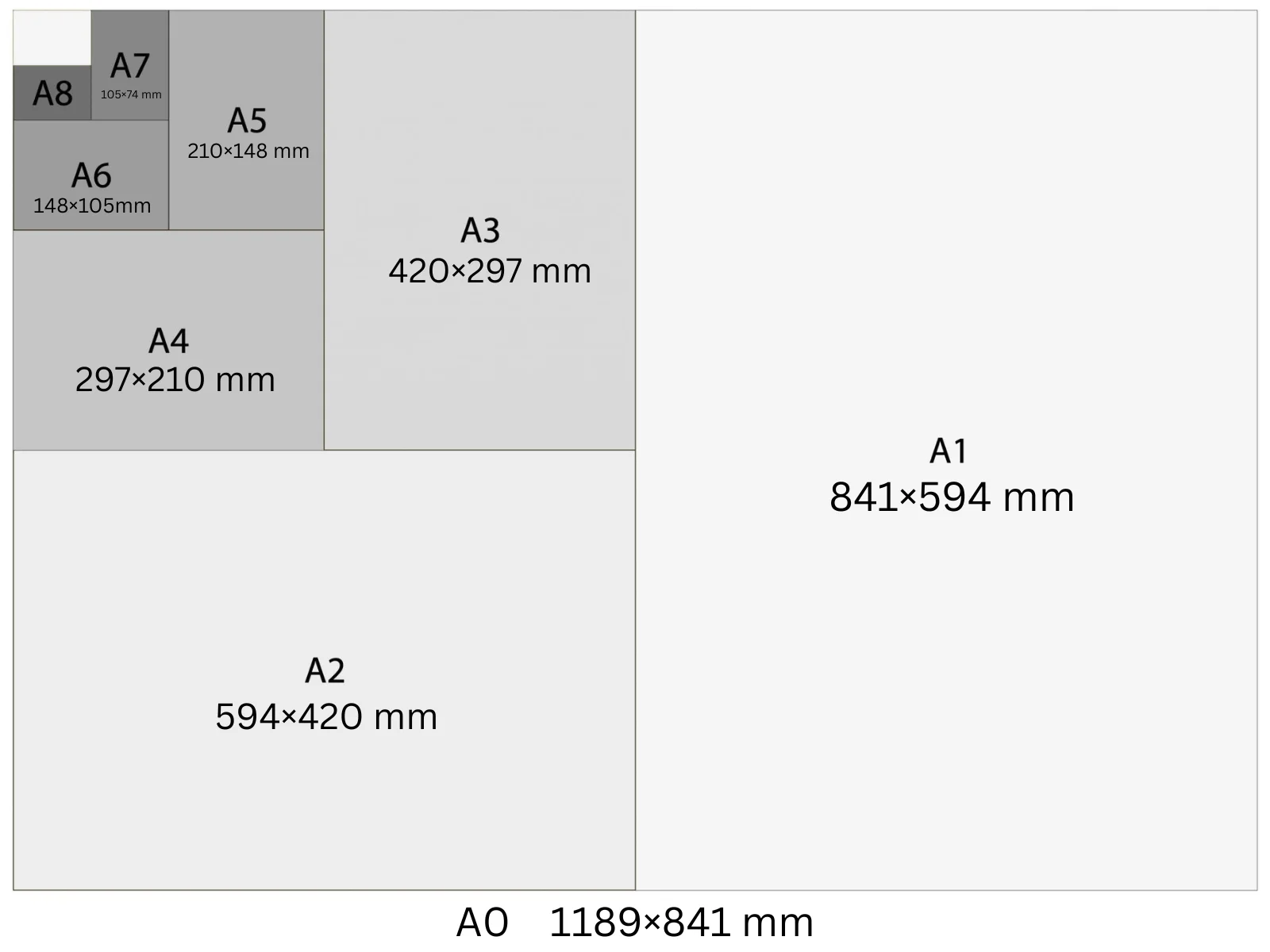
A4 is 210 × 297 mm (8.27 × 11.69 in) — the world's most used paper size outside North America. At 300 DPI it's 2480 × 3508 pixels. It's the default for documents, marketing one-pagers, event flyers, and notice board posters. The closest US equivalent is Letter (8.5 × 11 in), which is slightly shorter and wider.
In Playyy, A4 is a built-in size preset: choose it under the prompt box and your design starts at 2,480 × 3,508 px at 300 DPI, ready to export as a print PDF.
Specifications
| Pixels | 2,480 × 3,508 px (at 300 DPI) |
| Millimetres | 210 × 297 mm |
| Centimetres | 21.0 × 29.7 cm |
| Inches | 8.27 × 11.69 in |
| Aspect ratio | 1:1.414 |
| Colour mode | CMYK for print / RGB for screen |
| Bleed | 3 mm |
| Safe zone | 5 mm from trim |
Design at A4 size with Playyy
Free to start · Watermark-free exports
A4 in Pixels at Different DPI
The pixel count changes with DPI setting — choose the right one for your output.
| DPI | Width (px) | Height (px) | Use |
|---|---|---|---|
| 72 | 595 | 842 | Screen preview, PDF viewers |
| 96 | 794 | 1,123 | Windows screen standard, digital documents |
| 150 | 1,240 | 1,754 | Medium-quality print, home printers |
| 300 | 2,480 | 3,508 | Professional print, commercial offset |
Design Tips
- →For print, design at 300 DPI (2480 × 3508 px) with 3 mm bleed and CMYK colour. For screen PDFs, 96 DPI (794 × 1123 px) is sufficient and keeps file sizes manageable.
- →US Letter (8.5 × 11 in) is not interchangeable with A4 — Letter is 18 mm shorter and 6 mm wider. Specify the correct format before sending files to print.
- →Body text in A4 documents reads best at 9–11 pt with 1.4–1.6× line spacing. Margins of 20–25 mm on all sides keep the layout professional and legible.
- →For event flyers where the design runs to the edge, add 3 mm bleed beyond the 210 × 297 mm trim marks, giving a working canvas of 216 × 303 mm.
How to Make A4 Designs in Playyy
Three steps, no design software. Set the size once — from the size options or straight in your prompt — and every design comes out at 2,480 × 3,508 px.
- 1
Open Playyy
Playyy runs in your browser, so there's nothing to download. Sign in and you'll land on the Home page.
- 2
Type your prompt and set the A4 size
Describe what you want in the input box on the Home page, then set the size whichever way is quicker. Pick A4 from the size options right underneath — print, poster, and social formats are all in that list. Or just say it in your prompt, like "A4 at 2,480 × 3,508 px", and Playyy matches it. Either way you get 2,480 × 3,508 px at 300 DPI, with no converting from millimetres or inches.
- 3
Create your A4 design and export it for print
Playyy generates the design at the full 2,480 × 3,508 px — that's A4 at 300 DPI, the resolution commercial print expects. Allow 3 mm of bleed and export a print-ready PDF. Colour mode: CMYK for print / RGB for screen.
Create A4 designs with Playyy
Type a prompt, pick A4 from the size options underneath it, and export at 2,480 × 3,508 px — no design software needed.
Start designing free →Make something at A4
Prepare your image
See it in a workflow
Frequently Asked Questions
What is the size of A4 paper?+
A4 is 210 × 297 mm (8.27 × 11.69 inches). Defined by ISO 216, it's the most widely used paper size internationally. At 300 DPI the canvas is 2480 × 3508 px; at 96 DPI (screen standard) it's 794 × 1123 px.
Is A4 the same as 8.5 × 11?+
No. A4 (210 × 297 mm / 8.27 × 11.69 in) and US Letter (216 × 279 mm / 8.5 × 11 in) are different sizes. A4 is 18 mm taller and 6 mm narrower. Printing an A4 file on Letter paper clips the bottom edge unless you select 'fit to page'.
What do Americans call A4 paper?+
Americans use Letter (8.5 × 11 in) for most document printing — it's the rough US equivalent of A4. There's no direct US size called 'A4'. US print shops typically stock Letter, not A4; confirm with your supplier before ordering.
Which is bigger, A5 or A4?+
A4 is bigger. A4 is 210 × 297 mm; A5 is 148 × 210 mm — exactly half the area. Folding an A4 sheet in half along the long edge produces two A5 pages.
Is A4 the same as US Letter?+
No, though they are close. A4 is 210 × 297 mm (8.27 × 11.69 in); US Letter is 215.9 × 279.4 mm (8.5 × 11 in). A4 is 5.9 mm narrower and 17.6 mm taller. A design laid out for one will shift or clip when printed on the other, so pick the format for the destination country before you start.
How do I make a design in A4 size?+
Open Playyy, describe what you need in the prompt box and choose A4 from the size presets underneath. The design is generated at 2,480 × 3,508 px (300 DPI), every element stays editable, and you can export a print-ready PDF. Playyy is free to start.