A3 Paper Size
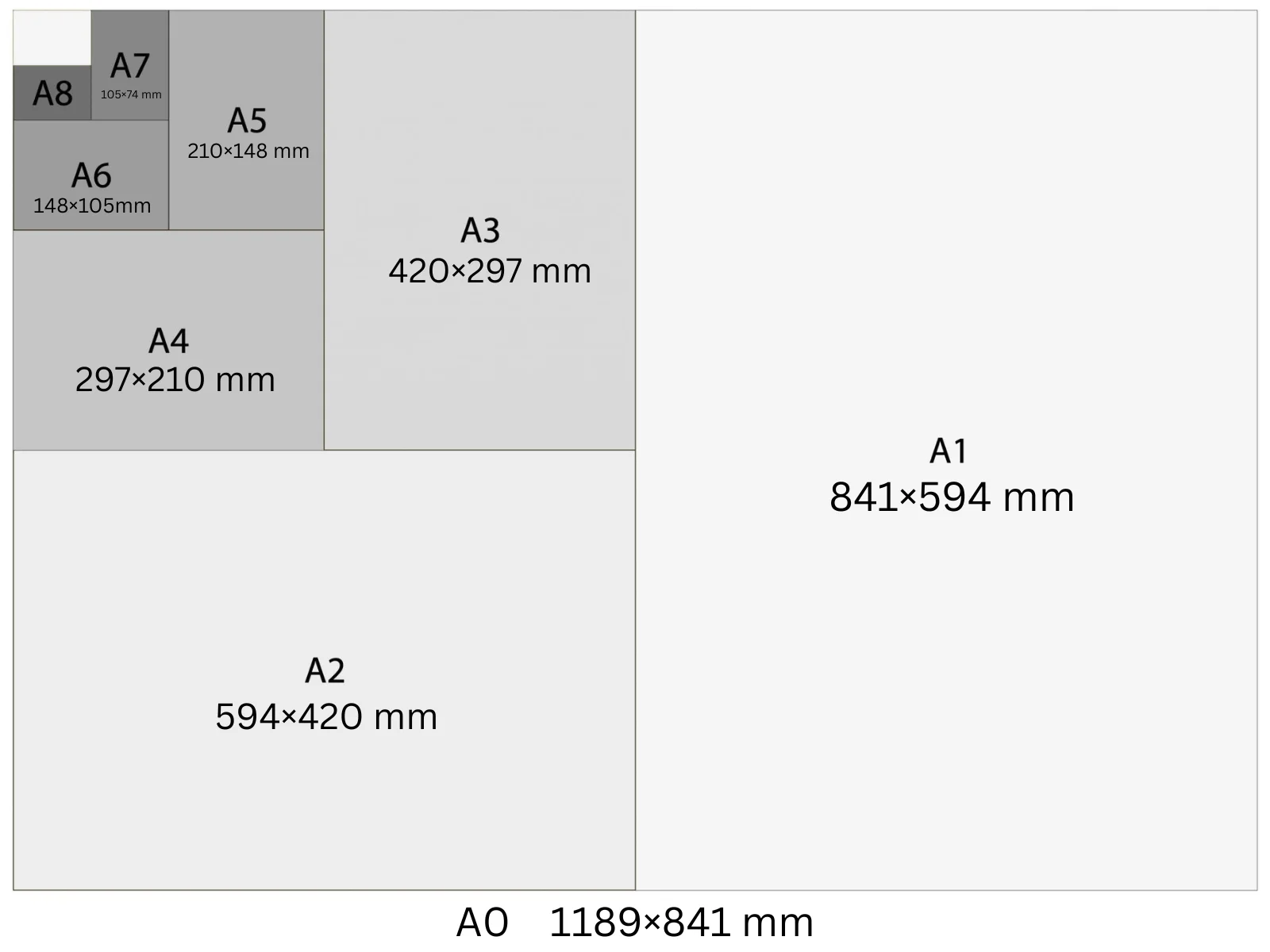
A3 in pixels is 3508 px wide by 4961 px tall at 300 DPI. Rotate it and A3 landscape is 4961 × 3508 px — same sheet, width and height swapped. In physical units that's 297 × 420 mm (11.69 × 16.54 in), exactly two A4 sheets side by side. The most common uses are restaurant menus, café specials boards, small event posters for indoor notice boards, and double-page spreads in print publications. The US equivalent is 11×17 in (Tabloid/Ledger).
In Playyy, A3 is a built-in size preset: choose it under the prompt box and your design starts at 3,508 × 4,961 px at 300 DPI, ready to export as a print PDF.
Specifications
| Pixels | 3,508 × 4,961 px (at 300 DPI) |
| Millimetres | 297 × 420 mm |
| Centimetres | 29.7 × 42.0 cm |
| Inches | 11.69 × 16.54 in |
| Aspect ratio | 1:1.414 |
| Colour mode | CMYK |
| Bleed | 3 mm |
| Safe zone | 5 mm from trim |
Design at A3 size with Playyy
Free to start · Watermark-free exports
A3 in Pixels at Different DPI
The pixel count changes with DPI setting — choose the right one for your output.
| DPI | Width (px) | Height (px) | Use |
|---|---|---|---|
| 72 | 842 | 1,191 | Screen preview, PDF viewers |
| 96 | 1,123 | 1,588 | Windows screen standard, digital documents |
| 150 | 1,754 | 2,481 | Medium-quality print, home printers |
| 300 | 3,508 | 4,961 | Professional print, commercial offset |
Design Tips
- →A3 is the minimum readable poster size for indoor viewing at 2–3 metres — below this, viewers need to step closer. Keep headline type at 36 pt or larger.
- →For A3 landscape, set the canvas to 4961 × 3508 px at 300 DPI rather than rotating a finished portrait file — rotating after layout leaves bleed and safe-zone margins on the wrong edges.
- →For double-page spreads, set the canvas at A3 (297 × 420 mm) and mark the A4 centreline at 148.5 mm. Allow for 5 mm gutter bleed on both sides of the spine.
- →A3 is widely available at office laser printers — check printer specs for bleed support before designing edge-to-edge artwork.
- →Laminated A3 menus are typically 297 × 420 mm plus 5 mm lamination overlap on each edge; account for this in your mounting design.
How to Make A3 Designs in Playyy
Three steps, no design software. Set the size once — from the size options or straight in your prompt — and every design comes out at 3,508 × 4,961 px.
- 1
Open Playyy
Playyy runs in your browser, so there's nothing to download. Sign in and you'll land on the Home page.
- 2
Type your prompt and set the A3 size
Describe what you want in the input box on the Home page, then set the size whichever way is quicker. Pick A3 from the size options right underneath — print, poster, and social formats are all in that list. Or just say it in your prompt, like "A3 at 3,508 × 4,961 px", and Playyy matches it. Either way you get 3,508 × 4,961 px at 300 DPI, with no converting from millimetres or inches.
- 3
Create your A3 design and export it for print
Playyy generates the design at the full 3,508 × 4,961 px — that's A3 at 300 DPI, the resolution commercial print expects. Allow 3 mm of bleed and export a print-ready PDF. Colour mode: CMYK.
Create A3 designs with Playyy
Type a prompt, pick A3 from the size options underneath it, and export at 3,508 × 4,961 px — no design software needed.
Start designing free →Make something at A3
Prepare your image
See it in a workflow
Frequently Asked Questions
What are A3 dimensions in cm?+
A3 is 29.7 × 42.0 cm (297 × 420 mm). It's exactly twice the area of an A4 sheet. Two A4 pages placed side by side in landscape orientation equal one A3.
What is A3 in pixels at 300 DPI?+
A3 at 300 DPI is 3,508 × 4,961 px. At 150 DPI it's 1,754 × 2,481 px. At 96 DPI it's 1,123 × 1,588 px. For professional print, always design at 300 DPI to avoid pixelation when the sheet is printed at full size.
How big is an A3 sheet?+
A3 is 297 × 420 mm (29.7 × 42.0 cm, or 11.69 × 16.54 inches). It's half the area of A2 and twice the area of A4. The US equivalent is 11 × 17 inches (Tabloid size).
What is A3 paper size in inches?+
A3 is 11.69 × 16.54 inches. The closest US paper size is Tabloid or Ledger at 11 × 17 inches — Tabloid is slightly taller (by 0.46 in) and slightly narrower (by 0.69 in) than A3.
Can I print A3 at home?+
Some home printers handle A3 (297 × 420 mm), but most consumer models stop at A4. Check whether your printer lists A3 or 'tabloid' support before designing. At 300 DPI an A3 file is 3,508 × 4,961 px, which is heavy for a home printer's memory — flatten layers before printing.
What is A3 size in pixels landscape?+
A3 landscape is 4,961 × 3,508 px at 300 DPI — the portrait dimensions with width and height swapped. At 150 DPI landscape A3 is 2,481 × 1,754 px, and at 96 DPI it's 1,588 × 1,123 px. Set the canvas to landscape before you lay out artwork so bleed and safe-zone margins land on the correct edges.
What are the width and height of A3 in px?+
In portrait orientation A3 is 3508 px wide and 4961 px tall at 300 DPI. In landscape the width is 4961 px and the height is 3508 px. At 150 DPI the portrait figures halve to 1,754 × 2,481 px, and at 96 DPI they are 1,123 × 1,588 px.
What is the aspect ratio of A3 in pixels?+
A3 has a 1:1.414 aspect ratio (1:√2), the same as every ISO 216 A-series size. In pixels that holds at any resolution: 3508 ÷ 4961 equals 0.707, and so does 1,754 ÷ 2,481 at 150 DPI. That constant ratio is why folding an A3 sheet in half produces an A4 with identical proportions.
How do I make a design in A3 size?+
Open Playyy, describe what you need in the prompt box and choose A3 from the size presets underneath. The design is generated at 3,508 × 4,961 px (300 DPI), every element stays editable, and you can export a print-ready PDF. Playyy is free to start.