A2 Paper Size
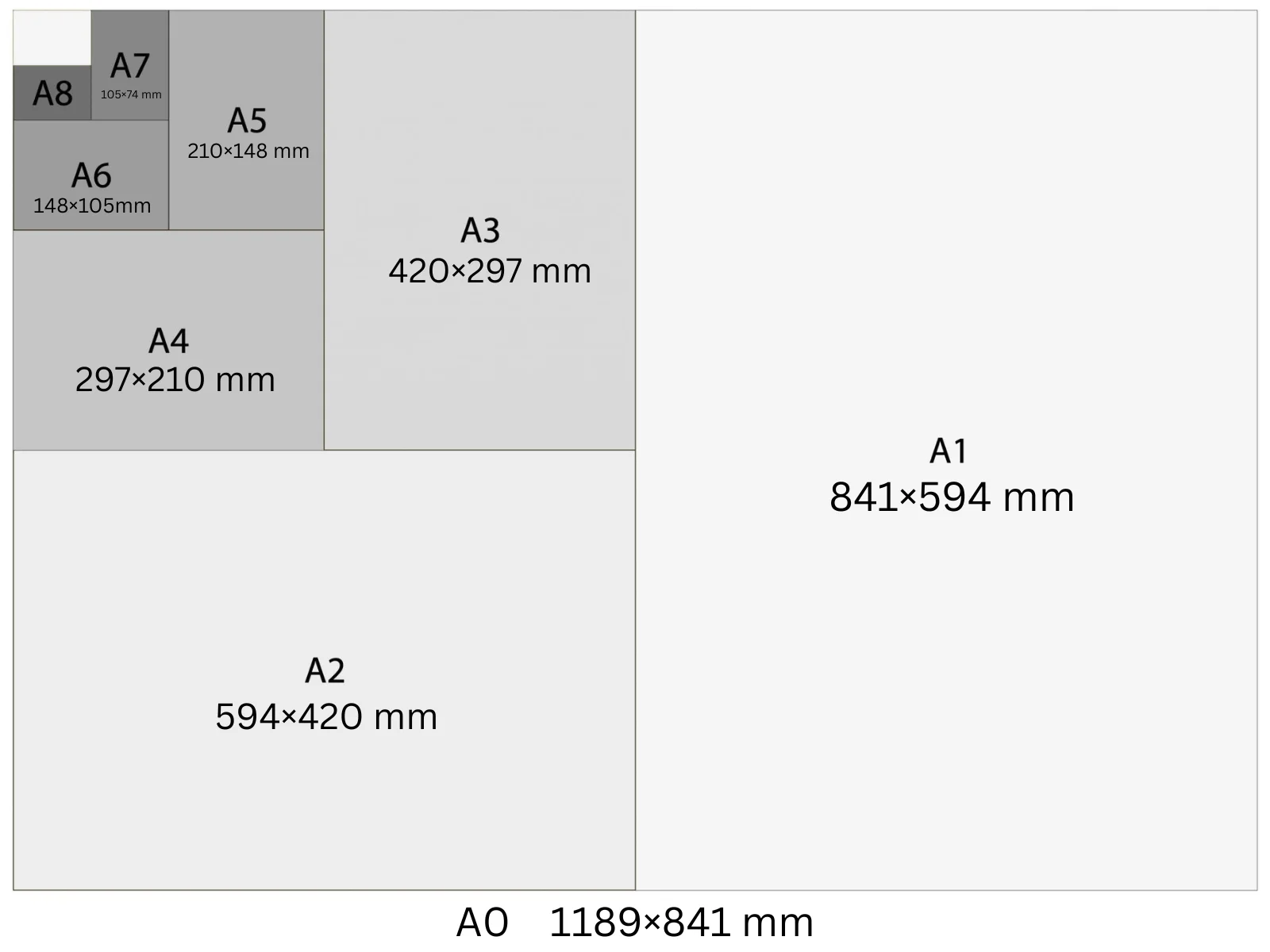
A2 is 420 × 594 mm — half an A1 and twice an A3. At 300 DPI, the canvas is 4961 × 7016 pixels. It's a versatile indoor poster size used for restaurant menus, event promotion, retail window inserts, and notice board displays where A3 is too small but A1 is too large.
In Playyy, A2 is a built-in size preset: choose it under the prompt box and your design starts at 4,961 × 7,016 px at 300 DPI, ready to export as a print PDF.
Specifications
| Pixels | 4,961 × 7,016 px (at 300 DPI) |
| Millimetres | 420 × 594 mm |
| Centimetres | 42.0 × 59.4 cm |
| Inches | 16.54 × 23.39 in |
| Aspect ratio | 1:1.414 |
| Colour mode | CMYK |
| Bleed | 3–5 mm |
| Safe zone | 10 mm from trim |
Design at A2 size with Playyy
Free to start · Watermark-free exports
A2 in Pixels at Different DPI
The pixel count changes with DPI setting — choose the right one for your output.
| DPI | Width (px) | Height (px) | Use |
|---|---|---|---|
| 72 | 1,191 | 1,684 | Screen preview, PDF viewers |
| 96 | 1,588 | 2,245 | Windows screen standard, digital documents |
| 150 | 2,481 | 3,508 | Medium-quality print, home printers |
| 300 | 4,961 | 7,016 | Professional print, commercial offset |
Design Tips
- →At A2, headline type should be 40–60 pt for viewing from 2–3 metres. Body copy works at 18 pt and larger.
- →Deliver CMYK PDFs with 5 mm bleed for commercial print; most copy shops accept A2 and can print on glossy or silk stock.
- →A2 landscape (594 × 420 mm) works well for menus, wall charts, and welcome signs at trade stands.
- →If using background photography, ensure the source image is at least 5000 px on the short edge to avoid upscaling artefacts at 300 DPI.
How to Make A2 Designs in Playyy
Three steps, no design software. Set the size once — from the size options or straight in your prompt — and every design comes out at 4,961 × 7,016 px.
- 1
Open Playyy
Playyy runs in your browser, so there's nothing to download. Sign in and you'll land on the Home page.
- 2
Type your prompt and set the A2 size
Describe what you want in the input box on the Home page, then set the size whichever way is quicker. Pick A2 from the size options right underneath — print, poster, and social formats are all in that list. Or just say it in your prompt, like "A2 at 4,961 × 7,016 px", and Playyy matches it. Either way you get 4,961 × 7,016 px at 300 DPI, with no converting from millimetres or inches.
- 3
Create your A2 design and export it for print
Playyy generates the design at the full 4,961 × 7,016 px — that's A2 at 300 DPI, the resolution commercial print expects. Allow 3–5 mm of bleed and export a print-ready PDF. Colour mode: CMYK.
Create A2 designs with Playyy
Type a prompt, pick A2 from the size options underneath it, and export at 4,961 × 7,016 px — no design software needed.
Start designing free →Make something at A2
Prepare your image
See it in a workflow
Frequently Asked Questions
What is the size of A2 paper in mm?+
A2 is 420 × 594 mm. It's half the area of A1 and exactly twice the area of A3. All A-series sizes share the 1:√2 aspect ratio, meaning you can fold any A-series sheet in half to get the next size down.
What is A2 in pixels?+
At 300 DPI (professional print), A2 is 4,961 × 7,016 px. At 150 DPI it's 2,481 × 3,508 px. At 96 DPI it's 1,588 × 2,245 px. For screen-only use, 96 DPI is sufficient. For commercial print, use 300 DPI.
What is A2 paper in inches?+
A2 is 16.54 × 23.39 inches. The closest US equivalent is an 18×24 inch poster — A2 is slightly narrower (by 1.46 in) and slightly shorter (by 0.61 in). For US print shops, order 18×24 and note A2 trim marks if exact ISO sizing is required.
Is A2 bigger than A3?+
Yes, exactly twice the area. A2 is 420 × 594 mm and A3 is 297 × 420 mm — A2 is an A3 sheet doubled along the short edge. Every step down the A-series halves the area while keeping the same 1:1.414 proportion.
What is A2 used for?+
A2 (420 × 594 mm) is the common size for indoor event posters, retail point-of-sale displays, art prints, and technical drawings. It is large enough to read from three to four metres but still fits standard frames and mailing tubes, which A1 and A0 do not.
How do I make a design in A2 size?+
Open Playyy, describe what you need in the prompt box and choose A2 from the size presets underneath. The design is generated at 4,961 × 7,016 px (300 DPI), every element stays editable, and you can export a print-ready PDF. Playyy is free to start.