A1 Paper Size
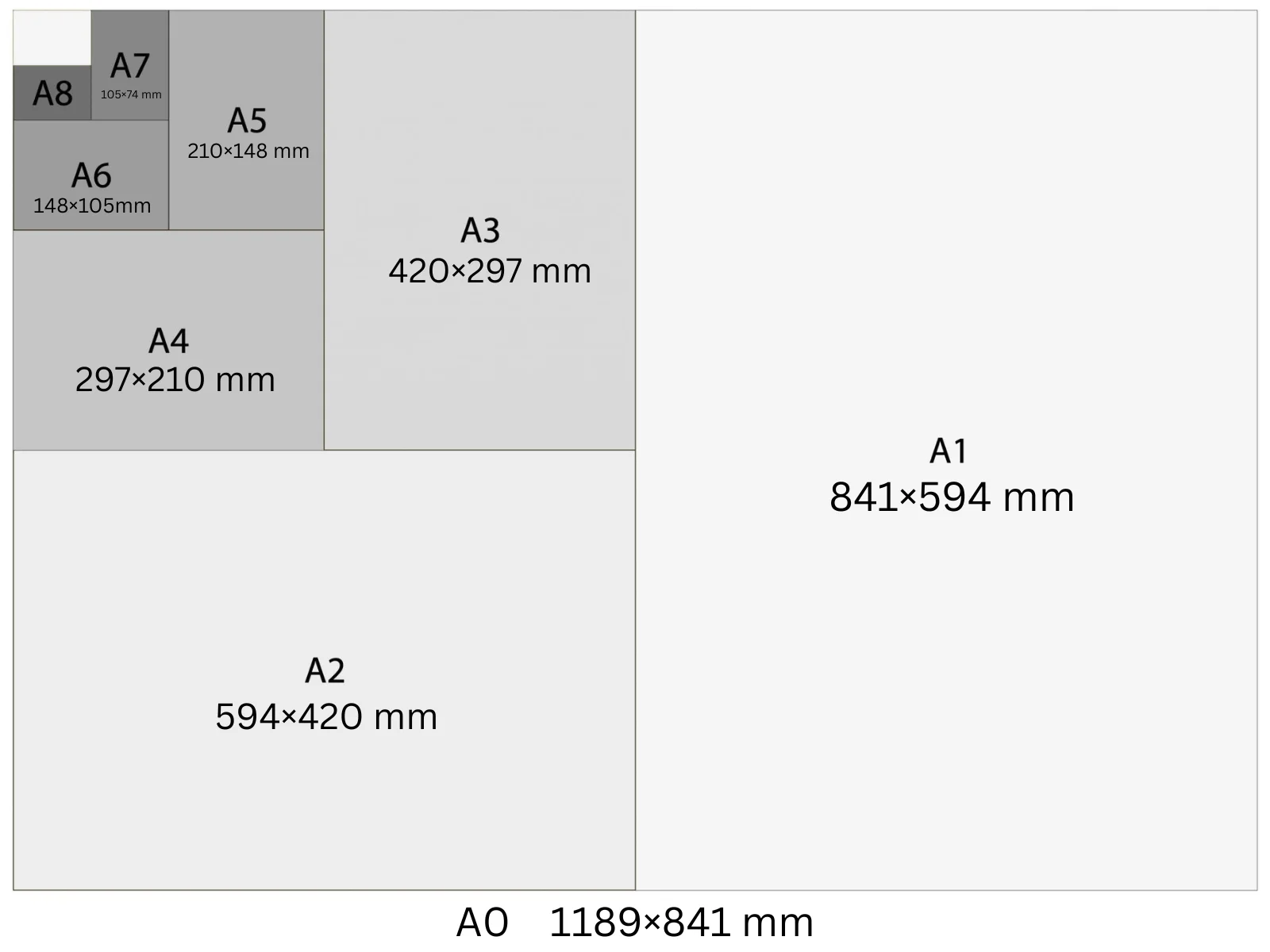
A1 is 594 × 841 mm — half the area of A0 and twice the area of A2. At 300 DPI it's 7016 × 9933 pixels. It's the standard size for outdoor event posters, retail window displays, and large conference room signage. Readable from 4–6 metres with 60 pt or larger headline type.
In Playyy, A1 is a built-in size preset: choose it under the prompt box and your design starts at 7,016 × 9,933 px at 300 DPI, ready to export as a print PDF.
Specifications
| Pixels | 7,016 × 9,933 px (at 300 DPI) |
| Millimetres | 594 × 841 mm |
| Centimetres | 59.4 × 84.1 cm |
| Inches | 23.39 × 33.11 in |
| Aspect ratio | 1:1.414 |
| Colour mode | CMYK |
| Bleed | 5 mm |
| Safe zone | 10 mm from trim |
Design at A1 size with Playyy
Free to start · Watermark-free exports
A1 in Pixels at Different DPI
The pixel count changes with DPI setting — choose the right one for your output.
| DPI | Width (px) | Height (px) | Use |
|---|---|---|---|
| 72 | 1,684 | 2,384 | Screen preview, PDF viewers |
| 96 | 2,245 | 3,179 | Windows screen standard, digital documents |
| 150 | 3,508 | 4,967 | Medium-quality print, home printers |
| 300 | 7,016 | 9,933 | Professional print, commercial offset |
Design Tips
- →Design at 300 DPI (7016 × 9933 px) for commercial print output — at A1 scale, 150 DPI shows grain on photographic content viewed close-up.
- →Headline type should be at least 60 pt to read from 5 metres. Body copy below 24 pt becomes unreadable at typical poster viewing distance.
- →For outdoor use, specify weatherproof lamination (gloss or matt) in the print brief — standard paper-based A1 warps in humidity.
- →Keep critical content within 20 mm of the trim edge as a safe zone; use 5 mm bleed for all edge-to-edge artwork.
How to Make A1 Designs in Playyy
Three steps, no design software. Set the size once — from the size options or straight in your prompt — and every design comes out at 7,016 × 9,933 px.
- 1
Open Playyy
Playyy runs in your browser, so there's nothing to download. Sign in and you'll land on the Home page.
- 2
Type your prompt and set the A1 size
Describe what you want in the input box on the Home page, then set the size whichever way is quicker. Pick A1 from the size options right underneath — print, poster, and social formats are all in that list. Or just say it in your prompt, like "A1 at 7,016 × 9,933 px", and Playyy matches it. Either way you get 7,016 × 9,933 px at 300 DPI, with no converting from millimetres or inches.
- 3
Create your A1 design and export it for print
Playyy generates the design at the full 7,016 × 9,933 px — that's A1 at 300 DPI, the resolution commercial print expects. Allow 5 mm of bleed and export a print-ready PDF. Colour mode: CMYK.
Create A1 designs with Playyy
Type a prompt, pick A1 from the size options underneath it, and export at 7,016 × 9,933 px — no design software needed.
Start designing free →Make something at A1
Prepare your image
See it in a workflow
Frequently Asked Questions
What is A1 paper size in cm?+
A1 is 59.4 × 84.1 cm (594 × 841 mm). It's half the area of an A0 sheet and twice the area of an A2 sheet. Like all ISO 216 sizes, it has a 1:√2 (approximately 1:1.414) aspect ratio.
What is A1 in pixels at 300 DPI?+
A1 at 300 DPI is 7,016 × 9,933 px. At 150 DPI it's 3,508 × 4,967 px. At 96 DPI it's 2,245 × 3,179 px. Use 300 DPI for professional print; 96 DPI is sufficient for digital-only documents.
What is A1 paper size in inches?+
A1 is 23.39 × 33.11 inches. This makes it comparable to the US 24×36 inch large-format poster (the US equivalent for outdoor and lobby signage). A1 is 0.61 inches narrower and 0.89 inches shorter than the US 24×36.
Is A1 a standard poster size?+
Yes. A1 (594 × 841 mm) is the international standard for large indoor event posters, window displays, and lobby graphics. In the US, the closest equivalent is the 24×36 inch poster. Both are suited for viewing from 3–5 metres.
How many A4 sheets fit in A1?+
Eight. A1 is 594 × 841 mm; folding it in half gives A2, again gives A3, and again gives A4. Each halving doubles the count, so one A1 sheet equals 2 × A2, 4 × A3, or 8 × A4 sheets by area.
How do I make a design in A1 size?+
Open Playyy, describe what you need in the prompt box and choose A1 from the size presets underneath. The design is generated at 7,016 × 9,933 px (300 DPI), every element stays editable, and you can export a print-ready PDF. Playyy is free to start.