A0 Paper Size
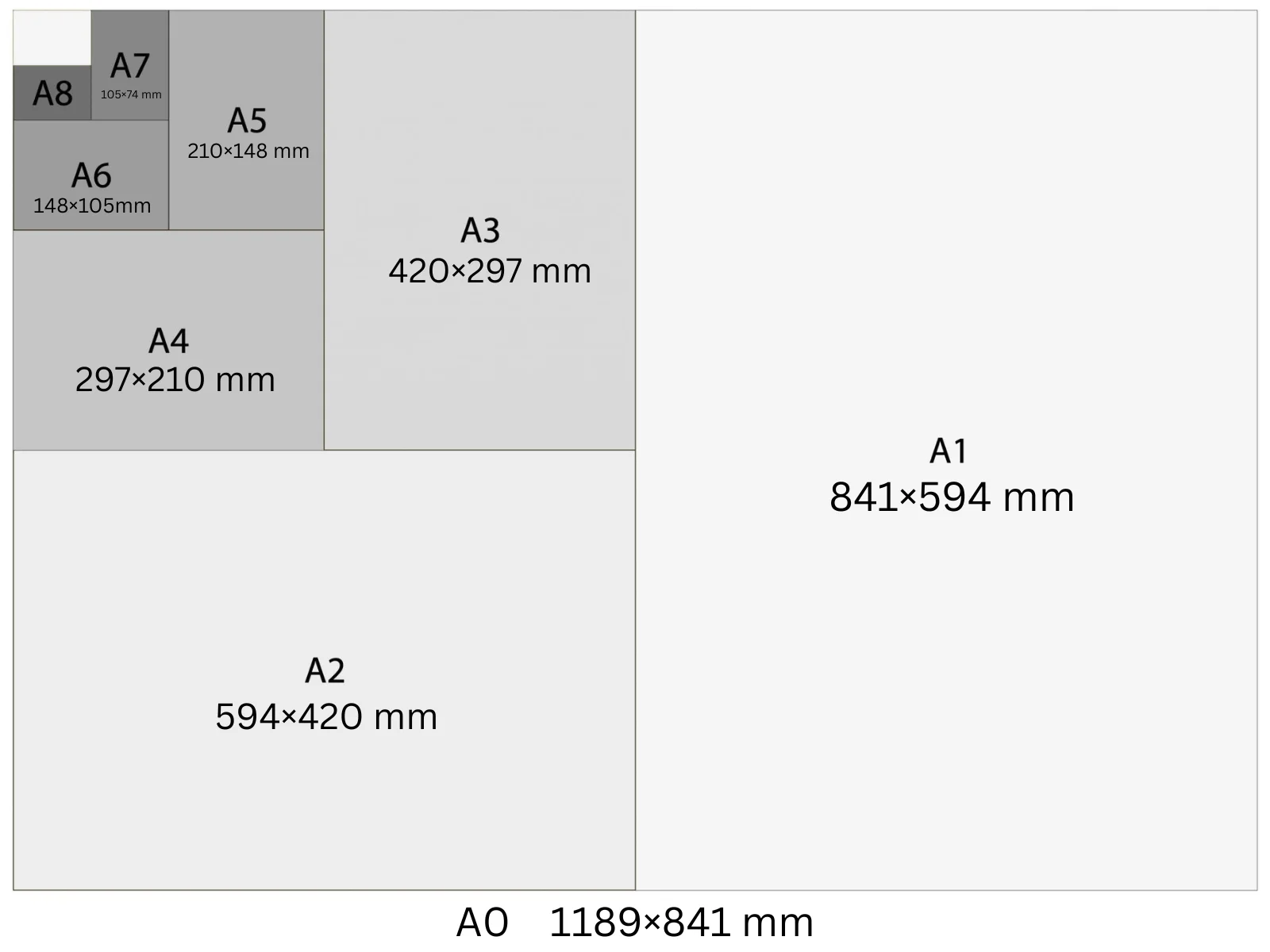
A0 is the largest standard ISO 216 paper size, measuring 841 × 1189 mm. It's the root of the A-series — every smaller size is half of A0. At 300 DPI, the canvas is 9933 × 14043 px. Used for trade show backdrops, exhibition graphics, and architectural floor plans where maximum surface area is required.
In Playyy, A0 is a built-in size preset: choose it under the prompt box and your design starts at 9,933 × 14,043 px at 300 DPI, ready to export as a print PDF.
Specifications
| Pixels | 9,933 × 14,043 px (at 300 DPI) |
| Millimetres | 841 × 1189 mm |
| Centimetres | 84.1 × 118.9 cm |
| Inches | 33.11 × 46.81 in |
| Aspect ratio | 1:1.414 |
| Colour mode | CMYK |
| Bleed | 5 mm |
| Safe zone | 10 mm from trim |
Design at A0 size with Playyy
Free to start · Watermark-free exports
A0 in Pixels at Different DPI
The pixel count changes with DPI setting — choose the right one for your output.
| DPI | Width (px) | Height (px) | Use |
|---|---|---|---|
| 72 | 2,384 | 3,370 | Screen preview, PDF viewers |
| 96 | 3,179 | 4,494 | Windows screen standard, digital documents |
| 150 | 4,967 | 7,022 | Medium-quality print, home printers |
| 300 | 9,933 | 14,043 | Professional print, commercial offset |
Design Tips
- →Always design at 300 DPI (9933 × 14043 px) — A0 is typically viewed from 2–4 metres, so headline type needs to be 80 pt minimum to remain legible.
- →Set up with 5 mm bleed on all four sides; most large-format printers require it for edge-to-edge output.
- →Deliver files as PDF/X-1a or PDF/X-4 with embedded CMYK profiles — large-format RIP software can't reliably convert RGB at this scale.
- →Keep the file below 500 MB by flattening layers before export; rasterised A0 files at 300 DPI can exceed 1 GB uncompressed.
How to Make A0 Designs in Playyy
Three steps, no design software. Set the size once — from the size options or straight in your prompt — and every design comes out at 9,933 × 14,043 px.
- 1
Open Playyy
Playyy runs in your browser, so there's nothing to download. Sign in and you'll land on the Home page.
- 2
Type your prompt and set the A0 size
Describe what you want in the input box on the Home page, then set the size whichever way is quicker. Pick A0 from the size options right underneath — print, poster, and social formats are all in that list. Or just say it in your prompt, like "A0 at 9,933 × 14,043 px", and Playyy matches it. Either way you get 9,933 × 14,043 px at 300 DPI, with no converting from millimetres or inches.
- 3
Create your A0 design and export it for print
Playyy generates the design at the full 9,933 × 14,043 px — that's A0 at 300 DPI, the resolution commercial print expects. Allow 5 mm of bleed and export a print-ready PDF. Colour mode: CMYK.
Create A0 designs with Playyy
Type a prompt, pick A0 from the size options underneath it, and export at 9,933 × 14,043 px — no design software needed.
Start designing free →Make something at A0
Prepare your image
See it in a workflow
Frequently Asked Questions
What is A0 paper size in mm?+
A0 is 841 × 1189 mm. It's the base size of the ISO 216 A-series — all other A sizes (A1, A2, A3, A4) are derived by halving A0 repeatedly along the long edge, each time maintaining the 1:√2 aspect ratio.
What is A0 in pixels at 300 DPI?+
A0 at 300 DPI is 9,933 × 14,043 px. At 150 DPI it's 4,967 × 7,022 px. At 96 DPI it's 3,179 × 4,494 px. Always use 300 DPI for professional large-format print — lower resolutions produce visible pixelation on an A0 sheet viewed at normal exhibition distance.
What is A0 paper used for?+
A0 is used for exhibition stands, trade show graphics, architectural drawings, engineering plans, and large retail window posters. It's the largest everyday print format — anything bigger (A-1 class banner roll) is typically sold by the metre.
How big is A0 compared to A4?+
A0 is 16 times the area of A4. Folding an A0 sheet in half four times produces an A4 sheet. In dimensions: A0 is 841 × 1189 mm; A4 is 210 × 297 mm.
Can a home printer print A0?+
No. Consumer inkjet and laser printers top out at A4 or A3. A0 requires a large-format plotter or a commercial print shop — the sheet is 841 mm wide, which is wider than most desktop printers are deep. Print shops usually output A0 on roll-fed plotters at 300 DPI or higher.
How do I make a design in A0 size?+
Open Playyy, describe what you need in the prompt box and choose A0 from the size presets underneath. The design is generated at 9,933 × 14,043 px (300 DPI), every element stays editable, and you can export a print-ready PDF. Playyy is free to start.