How to Make a PFP with AI — Gaming, Aesthetic & Professional
 Minji Park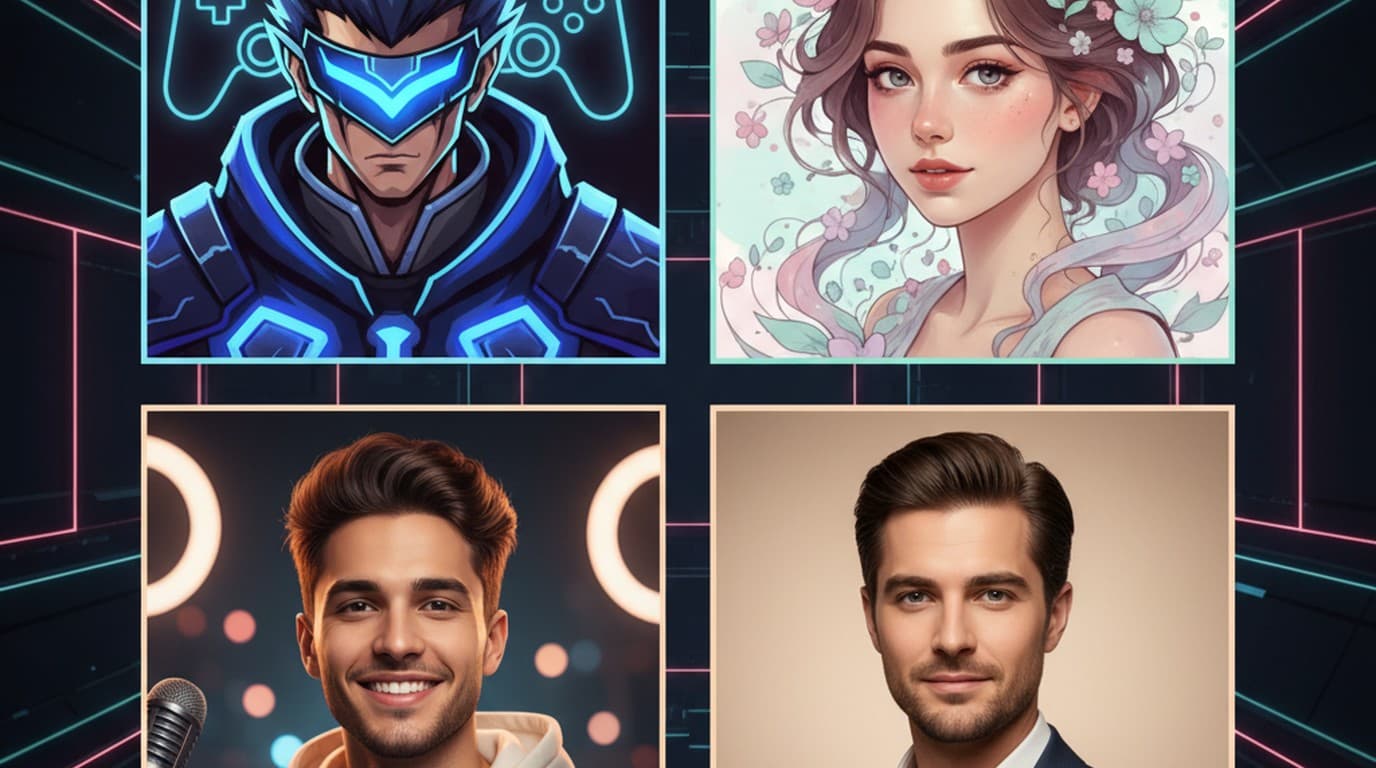
Your profile picture is doing more work than you might think. It's the image that shows up before anyone reads your username, clicks your video, or accepts your friend request. A generic stock photo or a blurry selfie signals low effort — and on platforms where first impressions happen in a thumbnail, that matters.
The problem is that most people don't have design software, a professional photographer, or the time to learn illustration. What's changed in 2026 is that you don't need any of those things. AI image generators can produce a custom pfp from a text description in a couple of minutes — gaming avatars, aesthetic portraits, YouTube channel art, and professional headshots included.
Direct answer. A pfp (profile picture) is the image representing your account on social platforms, gaming services, and messaging apps. To make a pfp with AI: go to Playyy, type a prompt describing your character, style, and background, generate the image, and refine any element by clicking it and typing your change. Export at your platform's required size. Total time: a few minutes, on the free plan, no design skills needed.
What Is a PFP (and Why It Matters More Than You Think)
PFP stands for profile picture — the small image that represents your account everywhere from Discord to LinkedIn. It's rendered small (often 40–128px in feeds), which means it needs to read clearly at thumbnail size: strong contrast, a simple focal point, and no visual clutter.
The pfp is also platform-specific in ways that matter. A gaming pfp lives in a Discord server next to dozens of other avatars; it needs to stand out at 32px. A YouTube pfp appears next to every comment you post, on your channel page, and in search results — consistency matters. A professional profile picture on LinkedIn renders next to your job title and company; low quality reads as low effort.
Getting a pfp right used to mean either hiring a designer or settling for a screenshot. An AI pfp maker changes that equation entirely.
How to Make a PFP with Playyy (Step by Step)
Knowing where to start is usually harder than the making itself. Here's the process.
Step 1: Open Playyy's AI image generator. No download needed. The free plan, with its daily bonus credits, covers every step.
Step 2: Write your prompt. Be specific about three things: the character or subject, the visual style, and the background. Examples:
- Gaming pfp: "anime character, dark hoodie, glowing red eyes, dark gradient background, 1:1 square, digital art style"
- Aesthetic pfp: "soft pastel portrait, floral crown, dreamy bokeh background, warm light, illustrated style"
- YouTube creator pfp: "confident creator looking at camera, studio lighting, clean light gray background, photorealistic, 1:1"
- Professional pfp: "professional headshot, business casual, soft natural light, white background, sharp focus"
Step 3: Generate and review. Playyy produces your image in seconds. If any element isn't right — the background color, the character's expression, the lighting — click on it and type your change. The AI editor applies edits to specific elements without regenerating the whole image.
Step 4: Apply finishing touches. Use background remover if you want a transparent or solid-color background. Use style transfer to shift the whole image toward a different aesthetic. Use inpainting to fix any artifact or detail that's off.
Step 5: Export at the right size. Platform pfp sizes as of October 2026: Discord 128×128px minimum (256×256px keeps it sharp), X 400×400px, Instagram 320×320px, YouTube 800×800px. See the full social media image sizes guide for every platform's current specs.
The entire workflow takes a few minutes. Even if you've never made a pfp before, you can get to a finished, platform-ready image in a single session — including background removal and size adjustments.

Gaming PFP Ideas: Fortnite, Roblox, and Beyond
Gaming pfps are their own category. The conventions are different — anime influence is common, darker backgrounds tend to dominate, and neon or glowing outlines are a signature of the aesthetic. Here's how to approach each major gaming community.
Fortnite pfp. Fortnite's visual style is colorful, high-contrast, and character-driven. Effective Fortnite-style prompts include references to specific skin archetypes: dark soldier, galaxy skin, superhero, sci-fi armored. Try: "Fortnite-style character portrait, galaxy skin with purple and blue gradients, glowing helmet visor, dark space background, digital art, 1:1". This produces an avatar that reads as Fortnite-adjacent without copying actual trademarked skins.
Roblox pfp. Roblox's signature aesthetic is blocky, cartoonish, and bright. The platform itself doesn't accept custom profile image uploads for in-game use, but Roblox pfps are everywhere on Discord servers, YouTube channels, and Twitter for Roblox content creators. Effective prompts: "Roblox-style avatar, blocky character, bright colors, simple background, flat illustration". Adding specific color combinations (your actual Roblox outfit colors) makes it feel personal.
Minecraft pfp. Pixel art and blocky 3D render styles both work. Try: "Minecraft character portrait, pixel art style, iconic creeper green, dark background, 8-bit aesthetic" or "3D rendered Minecraft skin portrait, dramatic lighting, dark stone background".
Cool pfp ideas that work across games. Dark background with a character in glowing outlines is the most universally legible gaming pfp format — it reads well at thumbnail size on any platform. Anime-style character portraits work particularly well for Discord gaming communities. Minimalist silhouette pfps (subject as a dark silhouette against a bright gradient) are popular for the same reason: strong thumbnail contrast.
On platforms like Discord the profile picture often carries more identity weight than the username — it's what people recognise in a member list or a message thread at 40 pixels wide. That's also why illustrated avatars often outperform photos in gaming communities: a bold, high-contrast graphic stays readable at that size, where a cropped face becomes an indistinct smudge.
Aesthetic PFP: Soft, Dark, Pastel, and Minimalist
Aesthetic pfps live on TikTok, Instagram, and Twitter — and the conventions are different from gaming. The goal is mood over character, and color palette is the primary signal.
Soft aesthetic pfp. Pastel palettes, floral elements, warm bokeh backgrounds, illustrated or semi-illustrated style. Prompt example: "soft aesthetic portrait, pastel pink and lavender tones, floral crown, dreamy blurred background, watercolor illustration style, 1:1".
Dark aesthetic pfp. Deep jewel tones, moody shadows, rain or fog, dramatic lighting. Prompt: "dark aesthetic portrait, deep teal and charcoal palette, mysterious expression, rain-slicked dark city background, cinematic lighting".
Minimalist pfp. A single subject on a solid-color background, usually in a complementary or monochrome palette. These are the cleanest at thumbnail size. Try: "minimalist portrait, subject centered, solid sage green background, clean composition, no clutter".
Gradient pfp. Solid or gradient background with a simple silhouette or character. Works well for accounts without a strong character concept — the color palette becomes the visual identity. Playyy's background remover lets you drop your subject onto any gradient you specify.
Playyy's style transfer feature is useful here: generate a base portrait, then shift the entire image toward a specific aesthetic (watercolor, oil painting, anime, pixel art) without re-prompting.

YouTube PFP and Creator Profile Pictures
A YouTube pfp appears in three places that matter: next to every comment you post (which reaches audiences you haven't built yet), on your channel page, and in YouTube search results next to your channel name. That's a lot of impressions.
The best YouTube pfps are readable at 40px, recognizable as a consistent visual identity, and match the channel's tone. A cooking channel and a gaming channel have very different pfp conventions — one skews warm and inviting, the other dark and dynamic.
For YouTube-specific pfps:
- Use a human face or clear character (people pick out faces faster than abstract imagery)
- Strong contrast between subject and background — flat mid-tone backgrounds disappear at small sizes
- If you have a brand color, use it as the background consistently across your channel art, thumbnail borders, and pfp
YouTube recommends uploading channel icons at 800×800px — larger than most platforms — though they display much smaller, so the design still has to hold up at thumbnail size. A clean photorealistic headshot, a stylized illustrated portrait, or a branded character all work. Generate at the full resolution in Playyy before exporting.
For creators building a broader visual identity beyond the pfp, the creator branding guide covers how to keep your pfp, banner, thumbnail style, and social presence consistent across every platform.
Professional PFP: LinkedIn, Teams, and Workplace Platforms
A professional pfp isn't just a headshot — it's a first impression on every recruiter, client, and colleague who views your profile before they reach out. LinkedIn recommends uploading a square photo of at least 400×400px; the bar is "clearly professional and clearly you."
The most common issues with professional pfps: low lighting (selfies in poor lighting look amateur even at thumbnail size), cluttered backgrounds (the background should not compete with your face), and photos that don't match the industry tone (a startup founder's pfp looks different from a law firm partner's).
AI-generated professional pfps work differently from gaming avatars — the goal is photorealism, not illustration. In Playyy, a prompt like "professional headshot, business casual, open-collar shirt, soft neutral background, window light from the left, photorealistic, sharp focus" produces a portrait with professional lighting and composition that you can use immediately.
The key lever is the background. Playyy's background remover strips any existing background from a photo of yourself, and the editor lets you replace it with exactly the neutral tone or environmental context you want. A real photo with an AI-optimized background often reads more authentically than a fully generated portrait.
For the full breakdown of AI headshot quality, use cases, and limitations, see the AI headshot generator guide.
LinkedIn has long said that profiles with a photo get far more profile views, connection requests and messages than profiles without one. Note what that compares: having a photo against having none — the gap between an adequate photo and a polished one is far narrower. The practical takeaway is that any decent headshot captures most of the benefit, and at the $0 cost of an AI pfp maker there's no reason to have none at all.
Your PFP Is Worth Getting Right
A profile picture takes a few minutes to make well with an AI pfp maker, and it's the image that shows up on every platform you use — every comment, every search result, every friend request. A weak pfp signals low effort before anyone has read a word you've written.
The prompting framework from this guide works for every style: describe the subject, the visual style, and the background. Playyy generates the image, and the AI editor handles refinements without a design background or paid subscription. Start at playyy.ai — the free plan is enough to make one.

Minji Park
I help indie creators, online educators and small product teams prepare launch visuals and social campaigns. My goal is to make launches feel polished and trustworthy — even when you are working without a designer.
Frequently asked questions
PFP stands for Profile Picture — the small square or circular image that represents you on social media platforms, gaming accounts, Discord servers, and messaging apps. It's the first visual impression anyone gets of your account, which is why a high-quality, on-brand PFP matters whether you're a gamer, creator, or professional.